Google Ads for Small Business: A Simple Beginner's Guide (2026)
How search ads work, what they cost in India, and the simple setup — keywords, location, ad copy and tracking — that stops wasted spend.
 Nancy Dahiya8 min read
Someone in your city is searching for your service right now.
"Dentist near me." "Coaching for class 12." "Café for birthday party."
With Google Ads, your business can appear at the very top of those results today — not in six months.
But many small businesses try Google Ads once, spend ₹5,000, get no customers and quit.
In this guide to Google Ads for small business, you'll learn the simple setup that avoids those mistakes: the right keywords, the right area, a clear ad and proper tracking.
What Is Google Ads (and How Does It Work)?
Google Ads is Google's advertising platform. You choose the searches you want to show up for, write a short ad, and set a budget.
The key thing to understand: you pay only when someone clicks your ad (or calls you from it). Showing up is free.
This is why it's called pay-per-click (PPC) advertising.
Ads appear at the top of Google with a small "Sponsored" label. Below them are the normal results — which you can only win with SEO and a strong Google Business Profile.
Ads bring customers from day one but stop the moment you stop paying. SEO and your Google profile take a few months but keep working for free. Smart businesses use ads while their free visibility grows.
Is Google Ads Right for Your Business?
Google Ads works best when people already search for what you sell. Ask yourself one question: "Would a customer type my service into Google?"
Works very well | Works less well |
|---|---|
Clinics, dentists, physiotherapy | Brand-new products nobody searches for yet |
Coaching institutes and tuition | Very cheap items with tiny profit |
Hotels, banquet halls, cafés for events | Businesses with no website or phone pickup |
Repair, plumbing, pest control, salons | Things people buy on impulse while scrolling |
If your business falls on the right side, Facebook and Instagram ads may suit you better — they show ads to people who aren't searching yet.
How Much Do Google Ads Cost in India?
There is no minimum spend. You set a daily budget and Google stays within it over the month.
A practical starting point for a local business is ₹300–₹700 per day for one month. That's enough data to see what works.
- Cost per click depends on your industry and city. Doctors and coaching in big cities cost more than a salon in a small town.
- On some days Google may spend a bit more than your daily budget, and less on other days — but your monthly total stays within your daily budget × about 30.4 days.
- In India, 18% GST is added to your ad spend.
Google needs a little time to learn. Run your campaign for at least 2–3 weeks before deciding if it works — but do check your search terms every few days (see Step #6).
Step #1: Get Ready Before You Spend a Rupee
Ads send people to your business. If that "landing spot" is weak, you're paying for people who leave.
- A page that matches the ad. If your ad says "Root canal in Sonipat", the page should talk about root canals — not your whole clinic history.
- A clear call or WhatsApp button at the top. (Here's everything a business website needs.)
- A fast page. Slow pages waste clicks. Check your website speed first.
- Someone to pick up the phone. Sounds obvious — but missed calls are the #1 reason ads "don't work".
Step #2: Choose Search Campaign (Not Everything at Once)
When you create a campaign, Google offers several types: Search, Performance Max, Display, Video and more.
For a small local business, start with a Search campaign. It shows text ads only to people who are searching for your service — the hottest customers there are.
If Google pushes you into a simplified setup, look for the option to switch to Expert Mode so you can control keywords and locations yourself.
Step #3: Pick Keywords Like a Customer
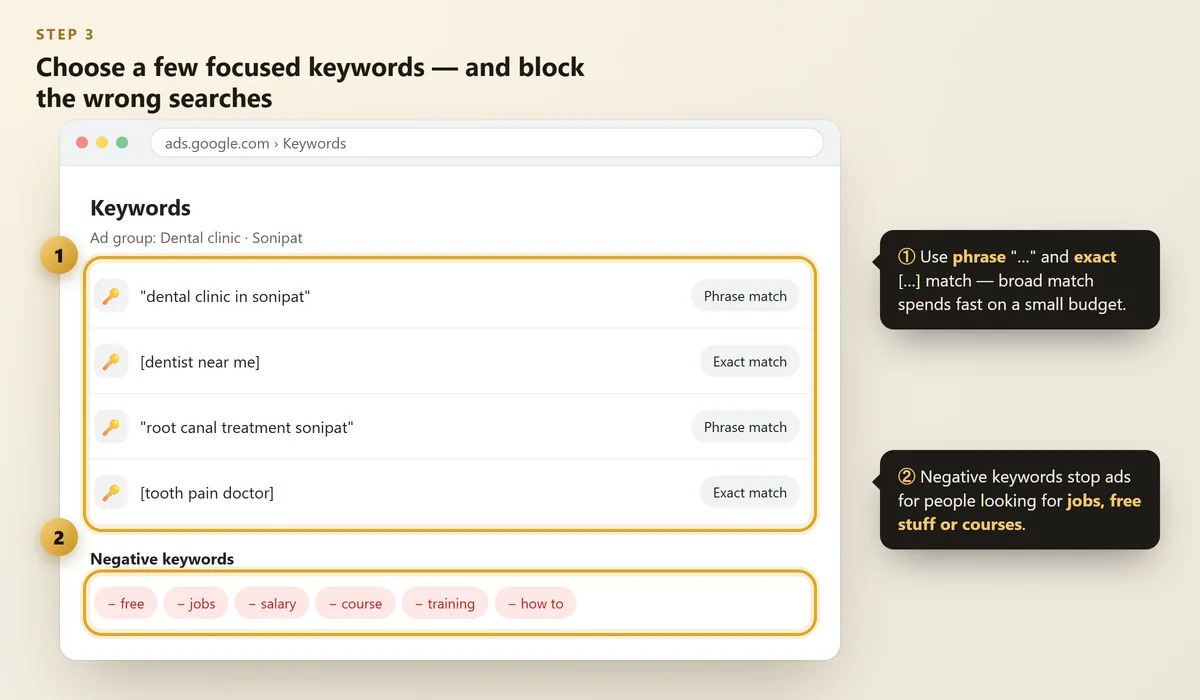
Keywords are the searches you want your ad to appear for. Think about what a ready-to-buy customer types.
 Illustration
- Service + city: "dental clinic in Sonipat", "IELTS coaching Panipat"
- Near me searches: "physiotherapist near me"
- Problem searches: "tooth pain treatment", "AC not cooling repair"
Use Google's free Keyword Planner to see how often people search for them.
Use match types to stay in control
Match type | How you write it | What it does |
|---|---|---|
Broad | dental clinic | Shows for many related searches — easy to waste money |
Phrase | "dental clinic" | Shows for searches with the same meaning |
Exact | [dental clinic] | Shows for searches with the closest meaning — most control |
For a small budget, start with phrase and exact match.
Add negative keywords
Negative keywords stop your ad showing for searches you don't want. Common ones for local businesses: free, jobs, salary, course, training, how to, DIY, wholesale.
This one step alone can save 20–30% of a wasted budget.
Step #4: Set Your Location Correctly
This is the most common (and most expensive) mistake we see.
 Illustration
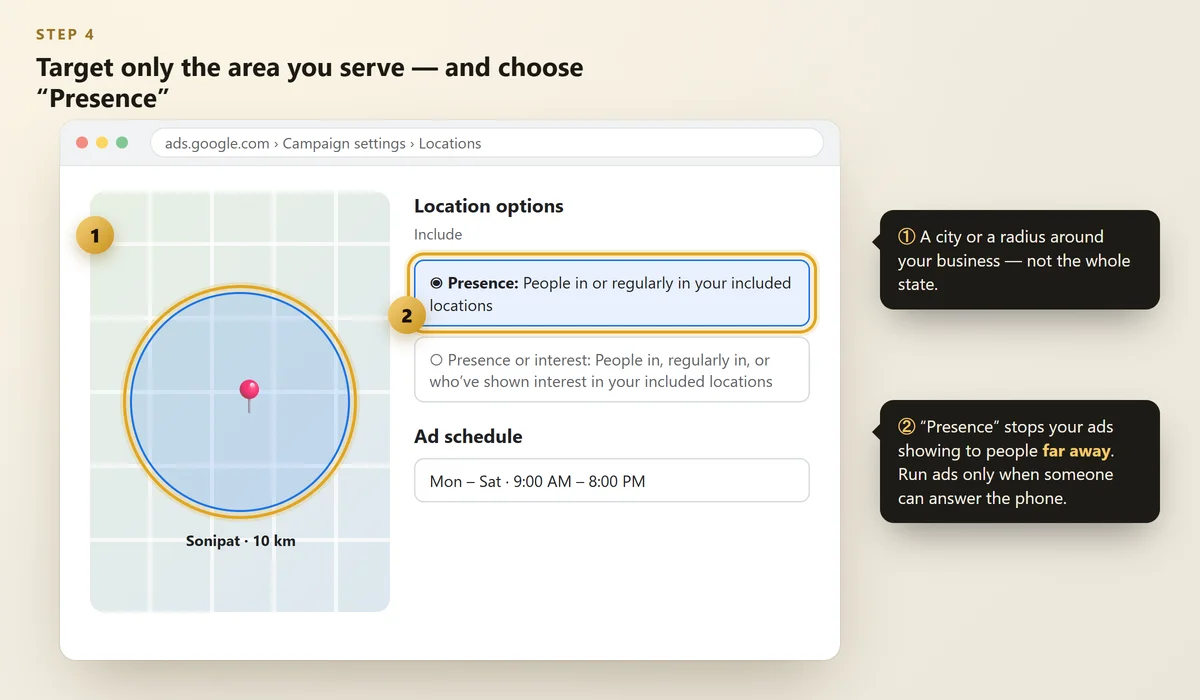
- Target your city or a radius (for example 10 km) around your business.
- Open Location options and choose "Presence: People in or regularly in your included locations".
- Set your ad schedule to the hours someone can answer the phone.
Without the "Presence" setting, your ad can show to people far away who are only interested in your city — and they'll rarely become customers.
Step #5: Write an Ad People Want to Click
 Illustration
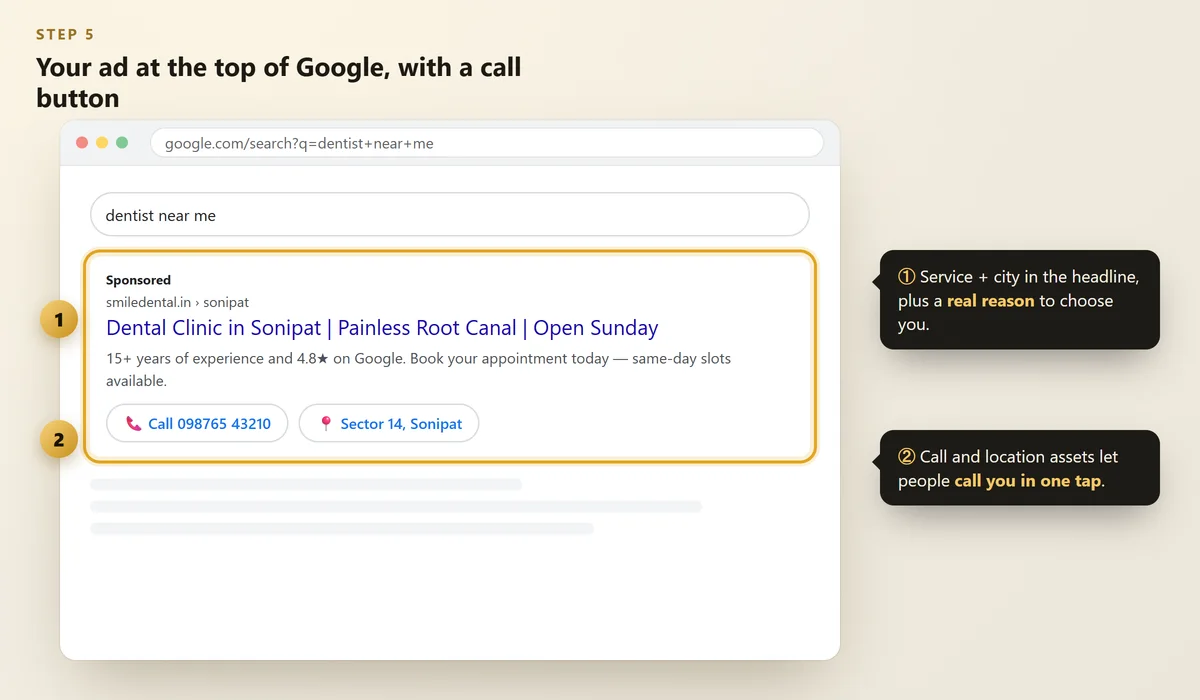
A search ad has headlines (up to 30 characters each) and descriptions (up to 90 characters). Google mixes them to find the best combination.
- Put the service and city in a headline: "Dental Clinic in Sonipat"
- Give a reason to choose you: "15 Years Experience", "Open Sundays", "4.8★ on Google"
- Tell them what to do: "Call Now for an Appointment"
- Add assets (extra ad parts): a call button, your location, and links to key pages.
Only promise what's true. Google checks ads against its policies, and customers check reviews. (Need more? Here's how to get more Google reviews.)
Step #6: Track Calls and Enquiries
Clicks are not customers. You need to know which ads bring calls, WhatsApp messages and form enquiries.
- Set up conversion tracking in Google Ads for calls from ads, website calls and form submissions.
- Connect your website to Google Search Console and Google Analytics.
- Ask every new customer: "How did you find us?" — and write it down.
Every few days, open the Search terms report. It shows the real searches that triggered your ads. Add the useless ones as negative keywords.
Google's Ads Transparency Center shows the ads any business is running. Search a competitor's name to see how they write their ads.
7 Google Ads Mistakes That Waste Money
- Using only broad match keywords
- No negative keywords
- Wrong location setting ("interest" instead of "presence")
- Sending all clicks to the homepage
- No conversion tracking
- Ads running at night when no one picks up the phone
- Giving up after 3 days — or never checking at all
FAQs
What is the minimum budget for Google Ads in India?
There's no fixed minimum. For a local business, ₹300–₹700 per day for a month is a sensible test. 18% GST is added to ad spend in India.
Can I run Google Ads without a website?
Yes — you can run call-focused ads or promote your Google Business Profile. But a simple, fast page that matches your ad usually gets far better results.
How long does it take to get results from Google Ads?
Ads can start showing within a day of approval. Give a new campaign 2–3 weeks to learn and settle before judging it.
Are Google Ads better than SEO?
They do different jobs. Ads bring quick customers while you pay; SEO and your Google profile bring free customers over time. Most growing businesses use both.
Do Google Ads help my Google Maps ranking?
No. Paying for ads does not change your free ranking on Google Maps or Search. Those depend on your profile, reviews, website and relevance.
Final Thoughts
Google Ads is not magic — it's a tap you can turn on to reach people who are already looking for you.
Start small: one Search campaign, a handful of focused keywords, the right area, a clear ad and proper tracking. Then improve it every week.
Want your first Google Ads campaign set up properly?
We set up and manage Google Ads for local businesses — with keywords, tracking and a landing page that converts.
Written by Nancy Dahiya
Nancy is the founder of Pehchaan Digital. She helps hospitals, coaching institutes, hotels and local businesses get found online — and writes these guides in plain language so owners can see what actually works.
Keep reading
All guides → Digital Marketing
Facebook & Instagram Ads for Local Business: Step-by-Step Guide (2026)
Boost or Ads Manager, the right objective, local targeting, budgets and WhatsApp ads — how to get real enquiries from Meta ads.
 Digital Marketing
QR Codes for Small Business: Get More Reviews, Followers & WhatsApp Chats
The three QR codes every shop, clinic and café should have — how to make them free, design them and place them.
 Digital Marketing
WhatsApp Business Setup Guide for Small Businesses (2026)
Set up your business profile, catalog, greeting and away messages, quick replies and labels in about 30 minutes.