How to Check Your Website Speed (and Fix the 5 Biggest Problems)
Test your site free with PageSpeed Insights, understand LCP, INP and CLS in plain words, and fix what slows you down.
 Nancy Dahiya7 min read
Imagine a customer finds your website on Google.
They tap it… and wait. And wait.
After a few seconds, they press back and call your competitor.
That's what a slow website does. And on mobile data, every second matters.
In this guide, you'll learn how to check your website speed for free — and fix the 5 problems that slow down most small business websites.
Why Website Speed Matters
- Customers leave slow websites. People on phones don't wait.
- Google cares about it. Page experience, including speed, is part of how Google judges pages.
- More enquiries. A fast site means more people reach your WhatsApp button and contact form.
Step #1: Test Your Website with PageSpeed Insights
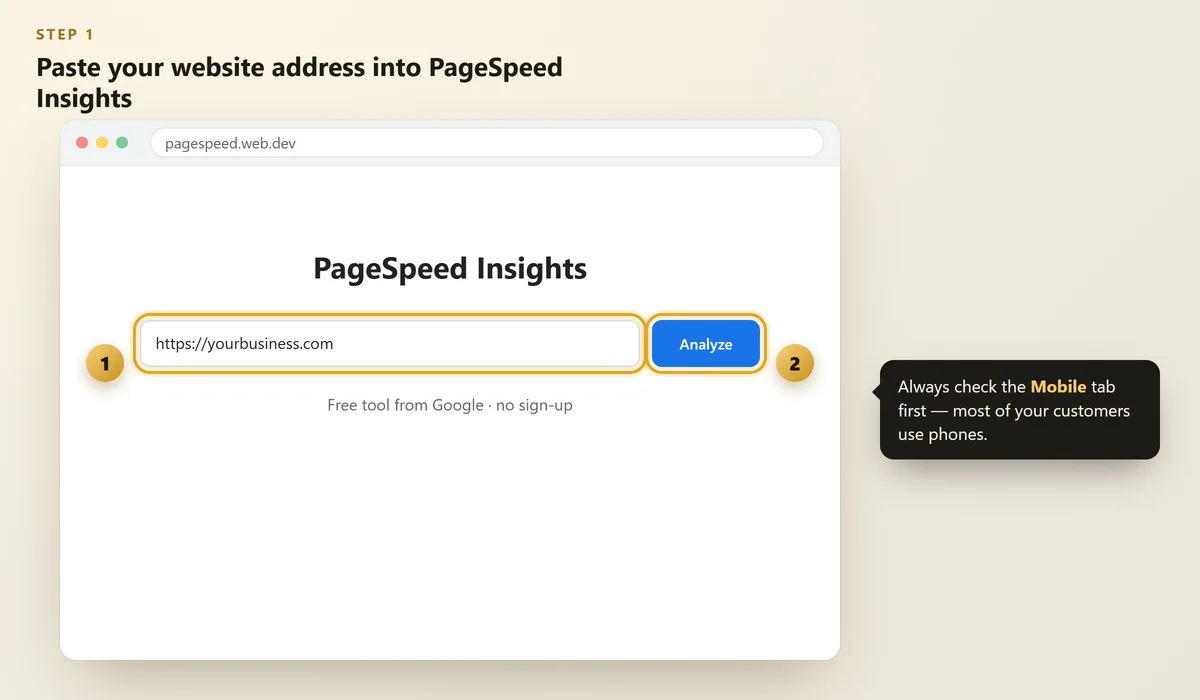
Go to PageSpeed Insights — a free tool from Google.
Paste your website address and click Analyze.
 Illustration
Always look at the Mobile tab first. Most of your customers visit on their phones, and mobile scores are usually lower.
Step #2: Understand the 3 Numbers That Matter Most
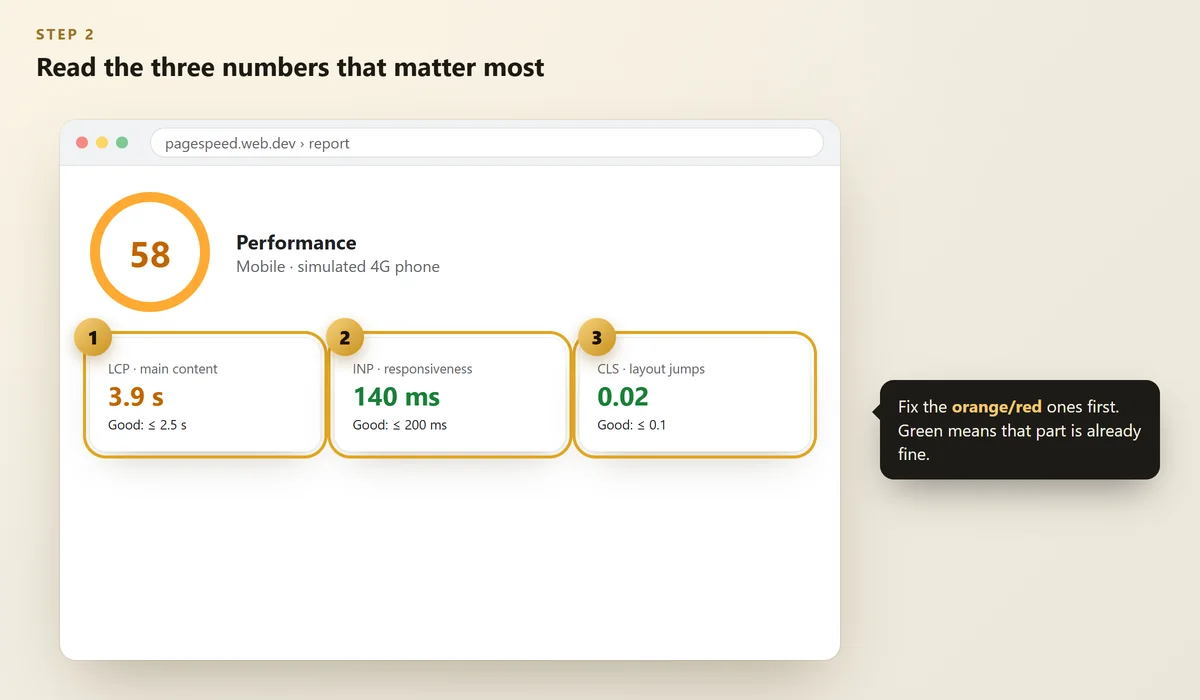
Ignore the long list for now. Focus on the three Core Web Vitals:
 Illustration
Metric | In simple words | Good score |
|---|---|---|
LCP (Largest Contentful Paint) | How fast the main content appears | 2.5 seconds or less |
INP (Interaction to Next Paint) | How quickly the page reacts when you tap | 200 ms or less |
CLS (Cumulative Layout Shift) | How much things jump around while loading | 0.1 or less |
These "good" limits come from Google's Web Vitals guide. If your site is in Google Search Console, the Core Web Vitals report shows the same data from real visitors.
The 5 Most Common Speed Problems (and Fixes)
Problem #1: Huge images
Phone photos are often 3–5 MB each. A website image rarely needs more than 100–200 KB.
Fix: resize images to the size they're shown at, and use modern formats like WebP. Show smaller versions on phones.
Problem #2: Too many plugins or scripts
Chat widgets, sliders, pop-ups, tracking codes… each one adds weight.
Fix: remove anything you don't really use. Keep only what brings enquiries.
Problem #3: Slow, cheap hosting
If your server takes 2–3 seconds just to start responding, nothing else can be fast.
Fix: use good hosting with servers close to your customers (for India: Mumbai or Singapore), and use caching.
Problem #4: Heavy fonts and animations
Many fonts and fancy effects can delay the main text from appearing.
Fix: use 1–2 fonts, and make sure your main heading and text show immediately — not after an animation.
Problem #5: Things jumping while loading
Ads, banners or images without fixed sizes push content down as they load.
Fix: give images and banners fixed width and height so space is reserved in advance.
When we tested pehchaandigital.com, our mobile score was low. We moved our server closer to India, cached our content, sent smaller images to phones and loaded heavy 3D graphics only after the page was ready. Our mobile score roughly doubled. The same simple fixes work for most small business sites.
Step #3: Re-Test After Every Change
Scores can vary a little between tests. Run the test 2–3 times and look at the average.
Don't chase a perfect 100. A green or high-orange score with fast main content is great for a small business.
FAQs
What is a good PageSpeed score?
90–100 is excellent, 50–89 needs improvement, and below 50 is poor. For a small business, getting the main content to show in about 2.5 seconds matters more than the exact score.
Why is my mobile score lower than desktop?
The mobile test simulates a mid-range phone on a slower connection, so heavy images and scripts hurt more. That's also closer to what many real customers experience.
Why does my score change every time I test?
Network conditions and server response times vary slightly. Test a few times and compare averages, not single results.
Does website speed affect Google ranking?
Speed is one part of page experience, which Google considers. Great content still matters most, but a slow site loses visitors before they even read it.
Can I fix speed problems without a developer?
Some, yes — like compressing images and removing unused plugins. Server, caching and code issues usually need a developer.
Final Thoughts
A fast website is respect for your customer's time.
Test your site today, fix the biggest problem first, and test again. Small improvements add up quickly.
Building a new website? Read How to Choose a Website Developer and ask about speed before you hire.
Is your website slow?
We'll test your site and send you the most important speed fixes — free.
Written by Nancy Dahiya
Nancy is the founder of Pehchaan Digital. She helps hospitals, coaching institutes, hotels and local businesses get found online — and writes these guides in plain language so owners can see what actually works.
Keep reading
All guides → Websites
Google Search Console for Beginners: Get Your Website on Google
Add and verify your site, submit your sitemap, check pages with URL Inspection and understand your search report.
 Websites
12 Things Every Small Business Website Must Have
A practical checklist of what your website needs to turn visitors into calls, WhatsApp messages and walk-ins.
 Digital Marketing
QR Codes for Small Business: Get More Reviews, Followers & WhatsApp Chats
The three QR codes every shop, clinic and café should have — how to make them free, design them and place them.