Facebook & Instagram Ads for Local Business: Step-by-Step Guide (2026)
Boost or Ads Manager, the right objective, local targeting, budgets and WhatsApp ads — how to get real enquiries from Meta ads.
 Nancy Dahiya8 min read
Your future customers spend hours every day on Instagram and Facebook.
They aren't searching for you. They're scrolling.
That's exactly why Facebook and Instagram ads work so well for local businesses: they put your offer in front of nearby people before they even think of searching.
In this guide to Facebook and Instagram ads for local business, you'll learn how to set up your first ad the right way — from choosing the objective to getting enquiries straight on WhatsApp.
Meta Ads in 30 Seconds
Facebook, Instagram and WhatsApp are all owned by Meta. One ad account lets you advertise on all of them.
- You choose who sees your ad — for example, people aged 25–50 within 8 km of your shop.
- You set a daily budget, and Meta shows your ad to the people most likely to respond.
- Ads can lead to a WhatsApp chat, a call, a form, your website or your profile.
Google Ads catches people who are already searching. Meta ads create demand among people who aren't searching yet. (Read our Google Ads guide to compare.)
"Boost Post" vs Ads Manager: Which Should You Use?
The Boost button on your post is the quickest way to run an ad. But it gives you fewer choices.
Boost post | Ads Manager | |
|---|---|---|
Setup time | 2 minutes | 10–15 minutes |
Objectives | Limited | All of them |
Targeting | Basic | Detailed, with placements and schedules |
Testing different ads | Not really | Yes — several ads in one campaign |
Best for | Getting more eyes on a good post | Getting enquiries and customers |
If you want enquiries, use Meta Ads Manager.
Step #1: Set Up the Basics
- A Facebook Page for your business, and your Instagram professional account connected to it
- A Meta Business account (business portfolio) — so the ad account belongs to your business, not one person
- A payment method in the ad account (in India, 18% GST is added to ad spend)
- WhatsApp Business on your business number — set it up with our WhatsApp Business guide
If an agency or freelancer runs your ads, give them partner access to your business account. Never let someone else own your Page or ad account.
Step #2: Choose the Right Objective
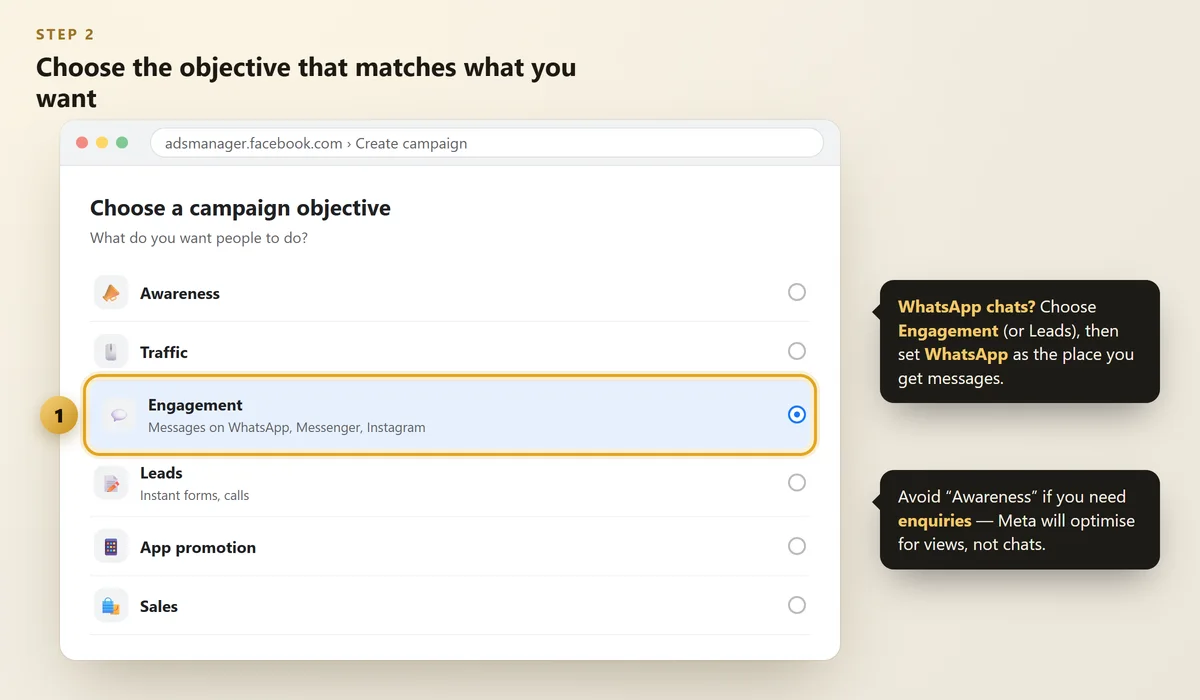
When you create a campaign, Meta asks for your objective — what you want people to do. This choice matters more than anything else, because Meta will find people who are likely to do exactly that.
 Illustration
Your goal | Objective to choose |
|---|---|
WhatsApp chats and bookings | Engagement (or Leads) with WhatsApp as the place you get messages |
Phone numbers of interested people | Leads with an instant form |
Visits to your website | Traffic |
Lots of local people to know your name | Awareness |
Online orders | Sales |
For most clinics, coaching centres, salons and cafés, WhatsApp message ads are the best place to start. People already love chatting on WhatsApp — and you can reply with prices, timings and photos. Meta explains these in ads that click to WhatsApp.
Ads about jobs, housing, loans or credit, and social or political issues must be marked as a special ad category. Targeting is limited for these, so declare it honestly to avoid rejection.
Step #3: Target the People Near You
 Illustration
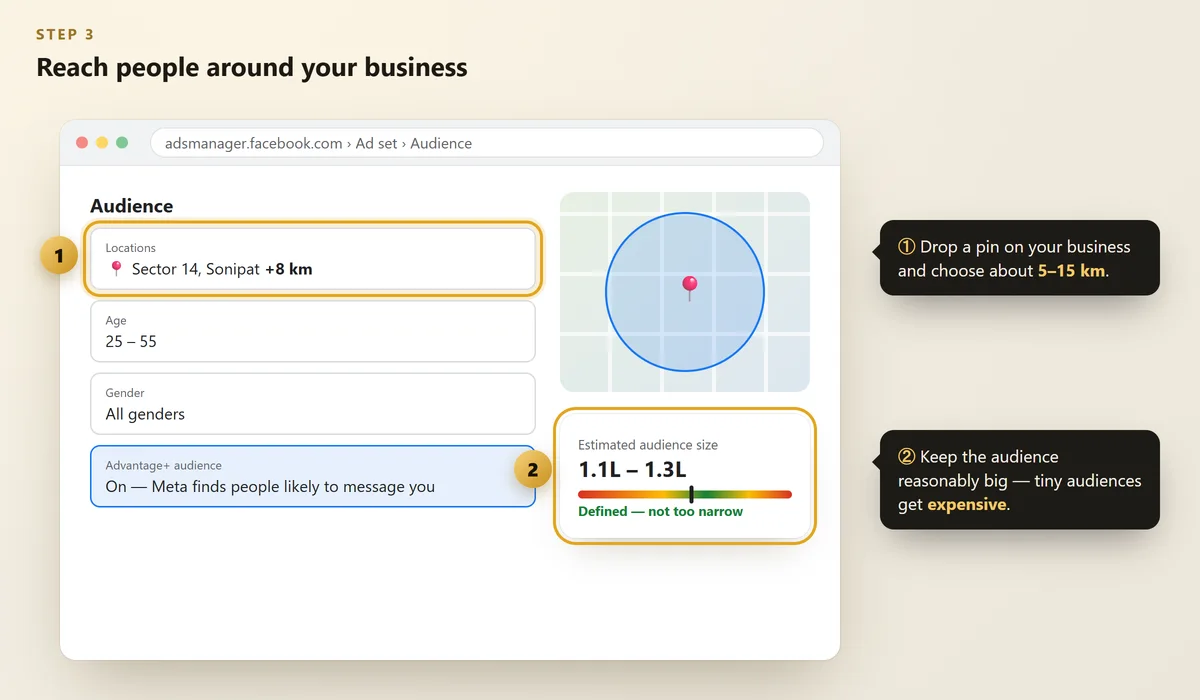
- Location: drop a pin on your business and choose a radius — about 5–15 km for most local businesses.
- Age: set the range of people who actually buy from you. (For a coaching centre, that's often the parents.)
- Interests: keep them broad. Meta's Advantage+ audience often finds buyers better than narrow interest lists.
- Language: leave it open unless you write your ads in one specific language.
An audience of a few thousand people gets expensive and tired quickly. Let your radius and age do the job, and let your ad itself attract the right people.
Step #4: Set a Budget That Can Learn
A good starting point for a local business is ₹300–₹500 per day for 7–14 days.
- Meta needs a few days of data to learn who responds. Avoid editing the ad every day.
- Run it on all placements (Facebook, Instagram, Reels, Stories) at first. Meta moves money to what works.
- After a week, check cost per WhatsApp conversation or cost per lead — not likes.
Step #5: Make an Ad That Stops the Scroll
 Illustration
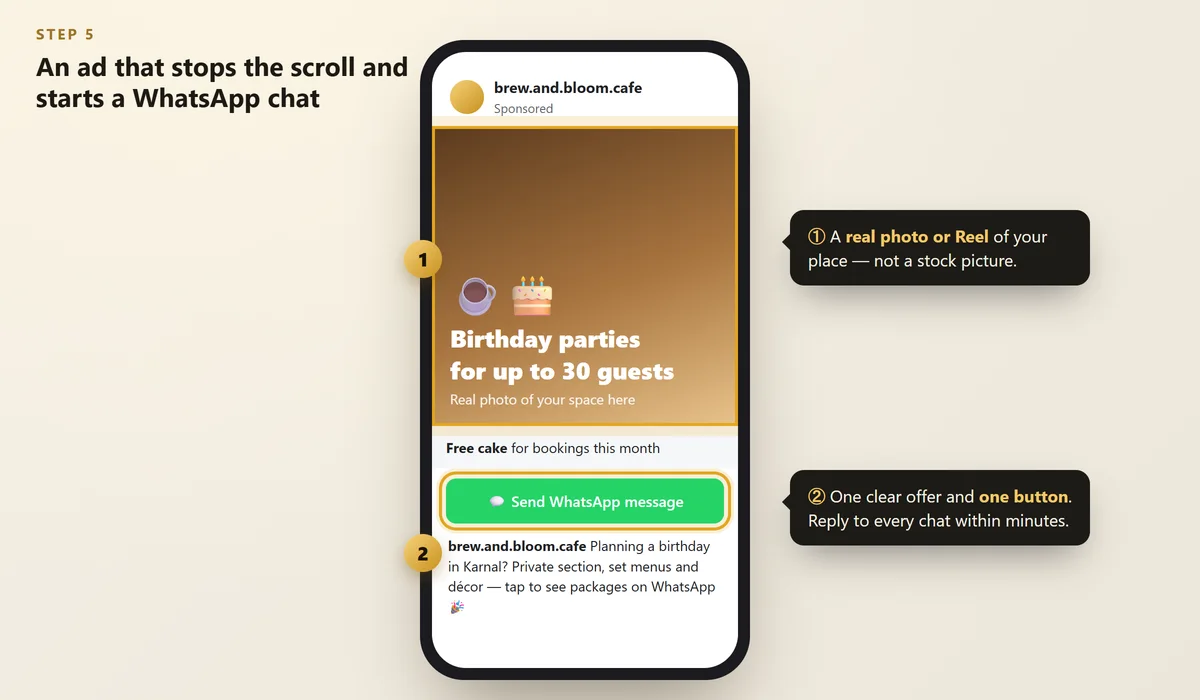
People decide in about one second whether to stop scrolling. Your ad needs:
- Real photos or short videos of your place, team and customers (with permission). Stock photos look like ads; real ones look like a business you can trust.
- Vertical video (9:16) for Reels and Stories — the first 3 seconds should show the result or the offer.
- A clear reason to message now: a free consultation, a demo class, a festive offer.
- One button: "Send WhatsApp message", "Book now" or "Learn more".
Need more content ideas? See how to turn Instagram followers into customers.
Step #6: Reply Fast — Then Measure
The ad's job is to start the conversation. Your reply is what turns it into a customer.
- Reply to WhatsApp messages within 5 minutes during business hours. Use quick replies for prices and timings.
- Label each chat (New enquiry, Booked, Follow up) in WhatsApp Business.
- Every week, count: messages → bookings → paying customers. That's your real result.
- If you send ads to your website, install the Meta Pixel so you can track enquiries from it.
The free Meta Ad Library shows every active ad on Facebook and Instagram. Search businesses in your field to get ideas (then make your own).
6 Mistakes That Waste Your Ad Budget
- Boosting posts for likes when you want customers
- Targeting the whole state instead of your area
- Using stock photos and long text on the image
- Changing the ad every day before it can learn
- Slow replies — or no replies — to messages
- Making claims you can't prove (especially for health, results or "guaranteed" marks)
FAQs
How much do Facebook and Instagram ads cost in India?
You choose your budget. For a local business, ₹300–₹500 per day for one to two weeks is a good test. 18% GST is added to ad spend in India.
Should I advertise on Facebook or Instagram?
Usually both. One campaign in Meta Ads Manager can run on Facebook, Instagram and Reels together, and Meta spends more where you get better results.
What's better: WhatsApp ads or lead form ads?
WhatsApp ads start a real conversation, so people are often warmer. Lead forms collect more contacts but some are less serious. Many local businesses start with WhatsApp.
Why was my ad rejected?
Common reasons are personal claims ("Are you overweight?"), before-and-after health images, misleading promises, or a missing special ad category. Edit the ad to follow Meta's advertising standards and request a review.
Do I need a website to run Meta ads?
No. WhatsApp, call and lead form ads work without one. A website still helps people trust you, and it's useful when you send ads there.
Final Thoughts
Facebook and Instagram ads let a small business reach every right person in its area for the price of a few pamphlets.
Start with one WhatsApp ad, a real photo or video, a clear offer and a small daily budget — then reply fast and track what turns into customers.
Want enquiries on WhatsApp from your ads?
We plan, create and run Facebook and Instagram ads for local businesses — and set up WhatsApp so no enquiry is missed.
Written by Nancy Dahiya
Nancy is the founder of Pehchaan Digital. She helps hospitals, coaching institutes, hotels and local businesses get found online — and writes these guides in plain language so owners can see what actually works.
Keep reading
All guides → Digital Marketing
Google Ads for Small Business: A Simple Beginner's Guide (2026)
How search ads work, what they cost in India, and the simple setup — keywords, location, ad copy and tracking — that stops wasted spend.
 Digital Marketing
QR Codes for Small Business: Get More Reviews, Followers & WhatsApp Chats
The three QR codes every shop, clinic and café should have — how to make them free, design them and place them.
 Digital Marketing
WhatsApp Business Setup Guide for Small Businesses (2026)
Set up your business profile, catalog, greeting and away messages, quick replies and labels in about 30 minutes.