WhatsApp Business Setup Guide for Small Businesses (2026)
Set up your business profile, catalog, greeting and away messages, quick replies and labels in about 30 minutes.
 Nancy Dahiya7 min read
In India, your customers don't fill forms. They WhatsApp you.
"Bhaiya, timing kya hai?" "Fees kitni hai?" "Location bhej do."
If you're answering these from your personal WhatsApp, you're wasting hours every week — and probably missing customers too.
The free WhatsApp Business app fixes that. In this guide, you'll set it up properly in about 30 minutes.
WhatsApp vs WhatsApp Business: What's the Difference?
Feature | Normal WhatsApp | WhatsApp Business |
|---|---|---|
Business profile (hours, address, website) | ✗ | ✓ |
Catalog of products/services | ✗ | ✓ |
Automatic greeting & away messages | ✗ | ✓ |
Quick replies (saved answers) | ✗ | ✓ |
Labels to organise chats | ✗ | ✓ |
Price | Free | Free |
You can read the official overview on the WhatsApp Business app page.
Step #1: Install WhatsApp Business and Choose a Number
Download WhatsApp Business from the Play Store or App Store.
Use a number that will stay with the business for years — ideally a separate SIM, not your personal number.
You can move it to WhatsApp Business. During setup, the app offers to bring your chat history across. Take a backup first, just to be safe.
Step #2: Fill In Your Business Profile Completely
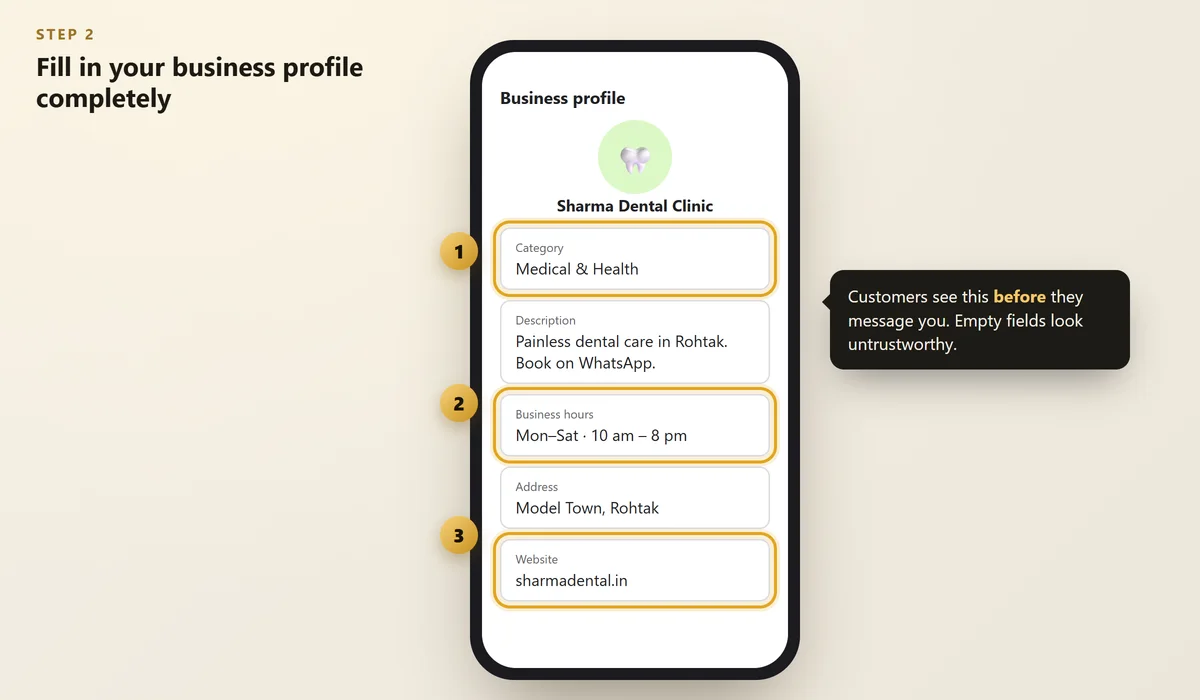
Go to Settings → Business tools → Business profile and fill in every field:
- Profile photo — your logo or a clear photo of your shop
- Category — e.g. Medical & Health, Education, Restaurant
- Description — one line: what you do + where
- Business hours
- Address and website
 Illustration
Use the same name, address and phone as on your Google Business Profile. Consistency builds trust. (More on that in our guide to local citations.)
Step #3: Turn On the Time-Saving Business Tools
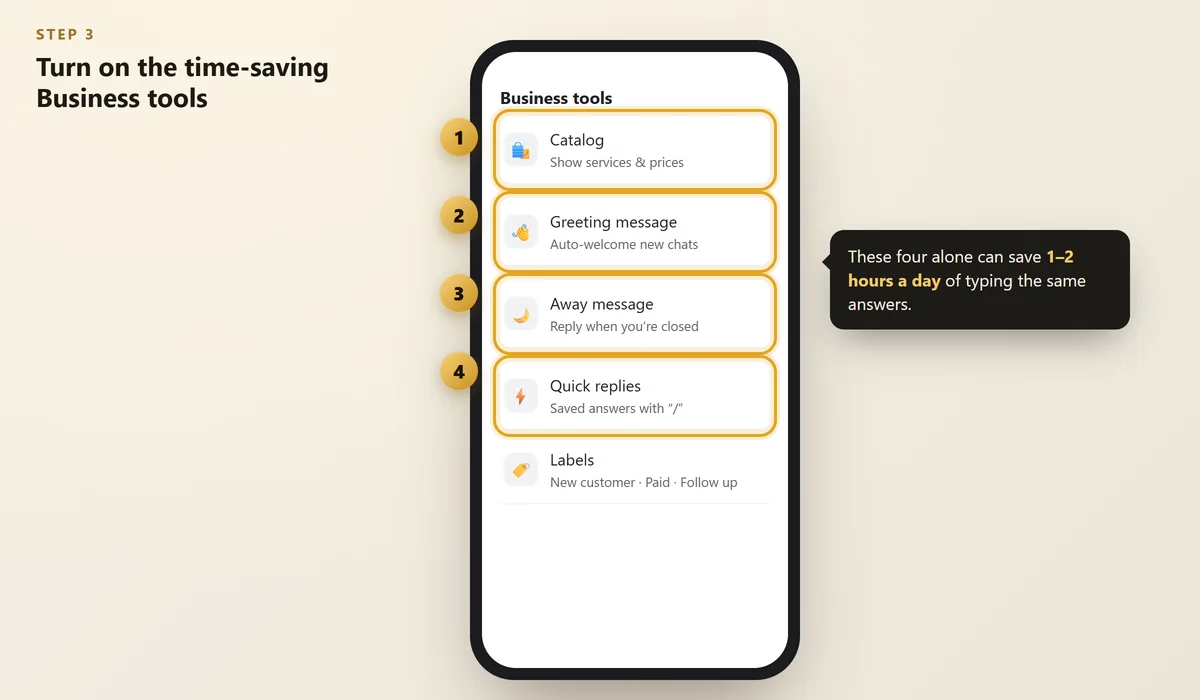
These four tools do most of the work for you:
 Illustration
1. Catalog
Add your main services or products with a photo, short description and (optional) price.
Now when someone asks "What do you offer?", you just share the catalog.
2. Greeting message
This is sent automatically when someone messages you for the first time.
3. Away message
Sent when you're closed, so nobody feels ignored.
4. Quick replies
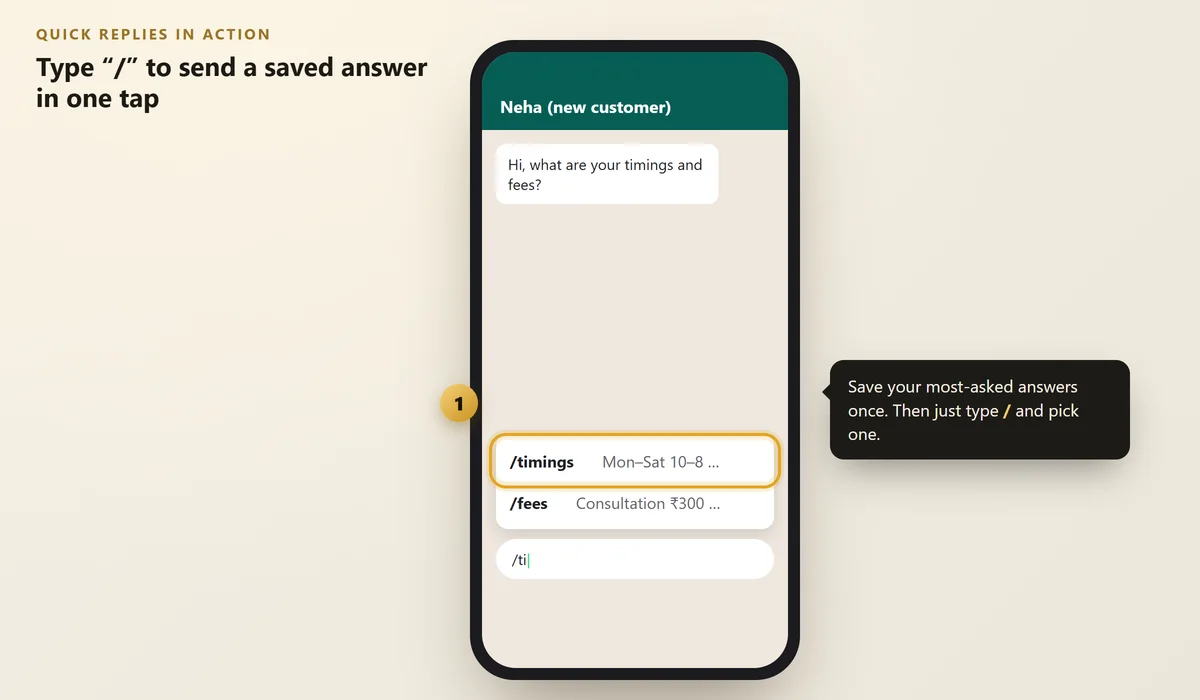
Save answers to the questions you get ten times a day. Then type / in any chat and pick one.
 Illustration
Good quick replies to create first: /timings, /fees, /location, /payment, /thanks.
Step #4: Use Labels to Never Lose a Customer
Labels are coloured tags for chats. Create these five:
- New customer
- Follow up
- Order / booking confirmed
- Paid
- Review requested
At the end of each day, open the Follow up label and reply to everyone. It's a simple CRM — for free.
Step #5: Share Your WhatsApp Link Everywhere
Your chat link looks like this: wa.me/91XXXXXXXXXX (country code + number, no spaces or +).
Add it to:
- Your Google Business Profile
- Your Instagram bio
- Your website (a floating WhatsApp button — see 12 website must-haves)
- A printed QR code at your counter — see QR codes for small business
Only message people who contacted you or agreed to hear from you. Sending bulk promotional messages to random numbers can get your number blocked or banned.
FAQs
Is WhatsApp Business free?
Yes, the WhatsApp Business app is free to download and use. Some advanced features (like the WhatsApp Business Platform for large companies) are paid, but small businesses usually don't need them.
Can I use WhatsApp Business and normal WhatsApp on the same phone?
Yes, as long as they use two different phone numbers. Many owners keep personal WhatsApp on one SIM and WhatsApp Business on the other.
Can more than one person use the same WhatsApp Business account?
WhatsApp Business supports linking extra devices, so staff can reply from another phone or a computer. Check the app's "Linked devices" option for the current limits.
Will customers see that I'm a business?
Yes. Your chat shows a business profile with your category, hours and address. This looks more professional and trustworthy.
How do I get more reviews using WhatsApp?
After a happy visit or delivery, send your Google review link with a short thank-you message. Our guide on getting more Google reviews has ready templates.
Final Thoughts
WhatsApp Business is the easiest free upgrade any small business in India can make.
Set up the profile, catalog, greeting, away message and quick replies today. Your future self will thank you every single day.
Want WhatsApp set up for you?
We set up WhatsApp Business, quick replies and simple automations for small businesses.
Written by Nancy Dahiya
Nancy is the founder of Pehchaan Digital. She helps hospitals, coaching institutes, hotels and local businesses get found online — and writes these guides in plain language so owners can see what actually works.
Keep reading
All guides → Digital Marketing
QR Codes for Small Business: Get More Reviews, Followers & WhatsApp Chats
The three QR codes every shop, clinic and café should have — how to make them free, design them and place them.
 Digital Marketing
How to Turn Instagram Followers Into Paying Customers
Likes don't pay bills. Here's how local businesses can turn Instagram attention into real enquiries and bookings.
 Websites
How to Check Your Website Speed (and Fix the 5 Biggest Problems)
Test your site free with PageSpeed Insights, understand LCP, INP and CLS in plain words, and fix what slows you down.