SEO for Small Business: A Simple Beginner's Guide (2026)
How to do SEO for your business yourself — the right keywords, a page for every service, local SEO and a monthly check, in simple steps.
 Nancy Dahiya9 min read

Your customers search on Google every day.
"Physiotherapist near me." "Best coaching for NEET in Rohtak." "Bakery for birthday cake order."
SEO is how your business shows up for those searches — without paying for every click.
And here's the good news: for a small business, SEO is not rocket science. It's a handful of basics done well, and repeated every month.
In this guide to SEO for small business, you'll learn exactly how to do SEO for your business — even if you've never touched a website's settings before.
What Is SEO (In Plain Words)?
SEO (search engine optimisation) means making it easy for Google to understand your website — and convincing it that your page is the best answer to a search.
Google looks at three big things:
- Relevance: does your page actually answer what was searched?
- Quality and trust: is the information helpful, accurate and from a real business?
- Experience: does the page load fast and work well on a phone?
Google explains the basics in its free SEO Starter Guide. Everything below follows the same principles — just made practical for a small business.
Google Ads put you on top today, but stop when you stop paying. Your Google Business Profile gets you on Google Maps. SEO gets your website into the normal results — slower to start, but free traffic that keeps coming. Most local businesses need the profile and SEO; ads are optional.
Step #1: Set Up the Free Tools First
Before changing anything, connect the two free tools that show you what's happening:
- Google Search Console — shows which searches bring people to your site and any problems Google finds. Follow our Search Console guide for beginners.
- Google Business Profile — your listing on Google Maps. If you serve customers in person, create one and optimise it.
Both are free and take under an hour to set up. Without them, you're doing SEO blindfolded.
Step #2: Find the Keywords Your Customers Actually Use
Keywords are simply the words people type into Google. The trick is to target the ones your customers use — not the ones you use internally.
A clinic might say "orthodontic treatment". Patients search "teeth braces cost".
Three free ways to find them
- Google's own suggestions: start typing your service in Google and note what it suggests. Scroll to "People also ask" and "Related searches".
- Search Console → Performance → Queries: the real words people already used to find you.
- Your customers: the questions you hear on calls and WhatsApp every day are perfect keywords.
Pick keywords you can actually win
Type | Example | How hard for a small business |
|---|---|---|
Very broad | dentist | Very hard — skip |
Service + place | dentist in Model Town Rohtak | Winnable |
Specific service | root canal treatment cost Rohtak | Winnable |
Question | how long does a root canal take | Easy — great for guides |
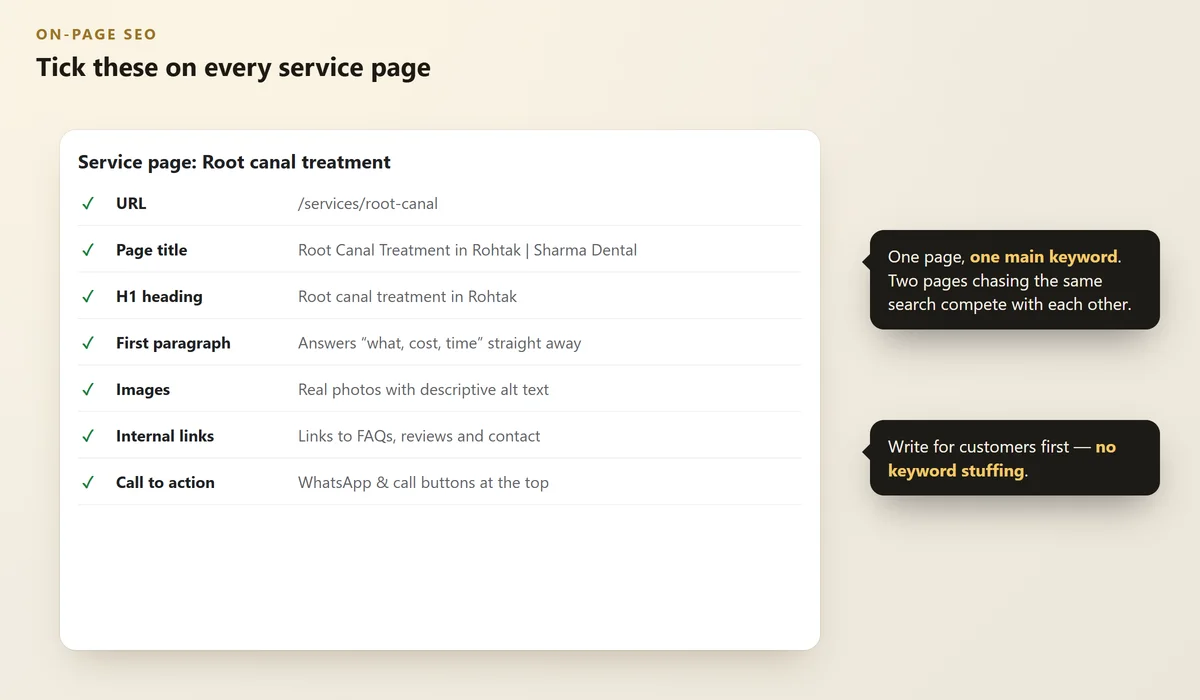
Give each page one main keyword. Two pages chasing the same keyword compete with each other.
Step #3: Do On-Page SEO on Every Important Page
On-page SEO is the part you fully control. For each main page (home, each service, contact):
 Illustration
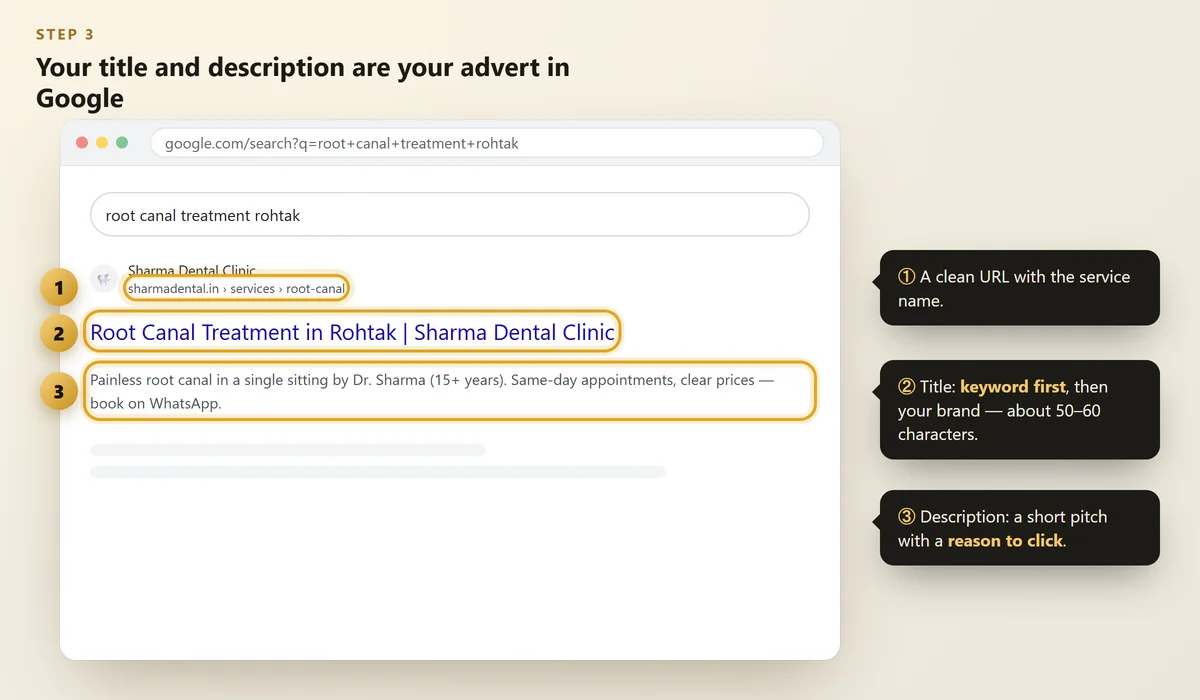
- Page title (about 50–60 characters): main keyword first, then your brand. "Root Canal Treatment in Rohtak | Sharma Dental Clinic". Google's guide: influencing title links.
- Meta description (about 150 characters): a short pitch with a reason to click. Read Google's snippet guide.
- One H1 heading that says what the page is about, using the keyword naturally.
- The first paragraph answers the search straight away.
- A clean URL:
/services/root-canal, not/page?id=123. - Image alt text that describes the photo ("dentist explaining root canal to a patient").
- Internal links to related pages, so Google and visitors find them.
 Illustration
Writing "best dentist Rohtak" ten times in a paragraph makes the page worse for readers and Google. Write naturally for a customer; use the keyword where it fits — in the title, heading and first lines.
Step #4: Give Each Service Its Own Page
This one change helps more small business websites than anything else.
One page listing "all our services" can only rank for one thing. A separate page for each main service can rank for each service — and answer the exact questions customers have about it: price range, process, time, FAQs.
See our checklist of 12 things every small business website must have for what else each page needs.
Step #5: Make the Site Fast and Mobile-Friendly
Most of your visitors are on a phone, often on mobile data. A slow page loses them before they read a word.
- Test your pages free with PageSpeed Insights — our guide on how to check website speed explains the scores.
- Compress images, remove plugins you don't use, and make sure buttons are easy to tap.
Step #6: Local SEO — Win Searches Near You
If customers visit you (or you visit them), local SEO matters most:
- A complete, active Google Business Profile with the right category and real photos.
- The same name, address and phone on your website and every directory — see local citations in India.
- A steady flow of genuine reviews — here's how to get more Google reviews.
- Your area and city mentioned naturally on your service pages.
Step #7: Publish Helpful Content Regularly
Answer your customers' questions in short, useful articles: "How much does braces treatment cost?", "What documents do I need for admission?", "Which cake flavour is best for a kids' party?"
Google rewards helpful, people-first content written from real experience. One genuinely useful article a month beats ten copied ones.
Every article should link to the related service page — that's how content turns readers into enquiries.
Step #8: Earn Mentions and Links From Other Websites
When other trusted websites mention or link to you, Google sees it as a vote of confidence. Simple, safe ways for a small business:
- Listings on relevant directories and your industry association
- Local news, events you sponsor, or community pages
- Suppliers, partners and clients linking to you
- Guest articles on blogs your customers read
Packages promising "1,000 backlinks for ₹999" break Google's spam policies and can get your site pushed down. A few genuine mentions are worth far more.
Step #9: Track Progress Every Month
 Illustration
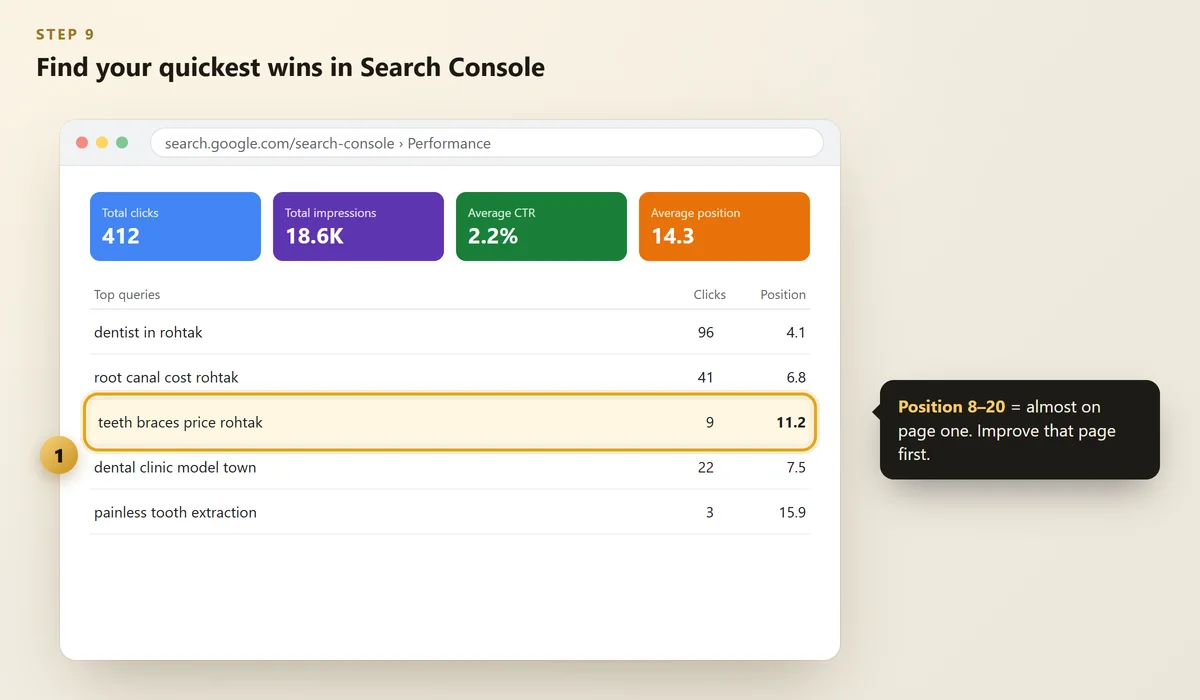
Once a month, open Search Console → Performance and look at:
- Clicks and impressions — are they growing?
- Queries at position 8–20 — you're almost on page one. Improve that page: answer the question better, add an FAQ, link to it from other pages.
- Pages with many impressions but few clicks — rewrite the title and description to be more appealing.
Also ask every new customer: "How did you find us?" That's the result that really matters.
How Long Does SEO Take?
Small fixes (titles, speed, Google profile) can show results in weeks. Real ranking growth for competitive searches usually takes 3–6 months of steady work. Anyone promising "page one in 7 days" is promising something they can't control.
FAQs
Can I do SEO for my business myself?
Yes. The basics — Google Business Profile, page titles and descriptions, a page for each service, speed and reviews — are things any owner can do with free tools. Hire help when you want to grow faster or don't have the time.
How much does SEO cost for a small business?
Doing it yourself costs only time. Professional SEO is usually a monthly service whose price depends on how much work your website needs and how competitive your searches are. Be wary of very cheap packages built on bought links.
What is the most important SEO step for a local business?
A complete Google Business Profile with genuine reviews, plus a website with a clear page for each service and your location mentioned naturally.
Do I need a blog for SEO?
It helps but isn't the first step. Fix your service pages and Google profile first, then add useful articles that answer your customers' real questions.
Can SEO guarantee the first position on Google?
No. Nobody controls Google's rankings. Good SEO improves everything Google looks at — and that reliably brings more visitors over time.
Final Thoughts
SEO for small business isn't about tricks. It's about being the most helpful, trustworthy answer for the searches your customers make.
Start with the free tools, fix your service pages, and check your progress once a month. Small, steady steps win.
Want SEO done for you?
We find the searches that bring real customers, fix your pages and Google profile, and report results in plain language — every month.
Written by Nancy Dahiya
Nancy is the founder of Pehchaan Digital. She helps hospitals, coaching institutes, hotels and local businesses get found online — and writes these guides in plain language so owners can see what actually works.
Keep reading
All guides → Websites
Website Cost in India (2026): What a Small Business Website Really Costs
Typical prices for a small business website in India, the yearly costs nobody mentions and how to get a fair quote — no hidden charges.
 Websites
How to Check Website Speed for Free (and Fix the 5 Biggest Problems)
Test your site free with PageSpeed Insights, understand LCP, INP and CLS in plain words, and fix what slows you down.
 Websites
Google Search Console for Beginners: Get Your Website on Google
Add and verify your site, submit your sitemap, check pages with URL Inspection and understand your search report.