How to Reply to Google Reviews (Templates for Good & Bad Reviews)
Copy-paste replies for 5-star, average and angry reviews — plus the 4-step formula that calms unhappy customers.
 Nancy Dahiya6 min read
Getting reviews is great.
But here's something most business owners miss: new customers read your replies too.
A calm, kind reply to a bad review can win you more trust than ten 5-star reviews.
And replying shows Google that your business is active and cares about customers. Google itself recommends it in its review management guide.
In this guide, you'll get a simple system — and copy-paste templates — for replying to every kind of review.
Why Replying to Reviews Matters
- It builds trust. People see a real person behind the business.
- It calms angry customers. Many will update or soften their review after a good reply.
- It brings more reviews. When people see you reply, they feel their review matters.
Don't have many reviews yet? Start with How to Get More Google Reviews.
Step #1: Find Your Reviews
Search your business name on Google while signed in, or open the Google Maps app and go to your profile.
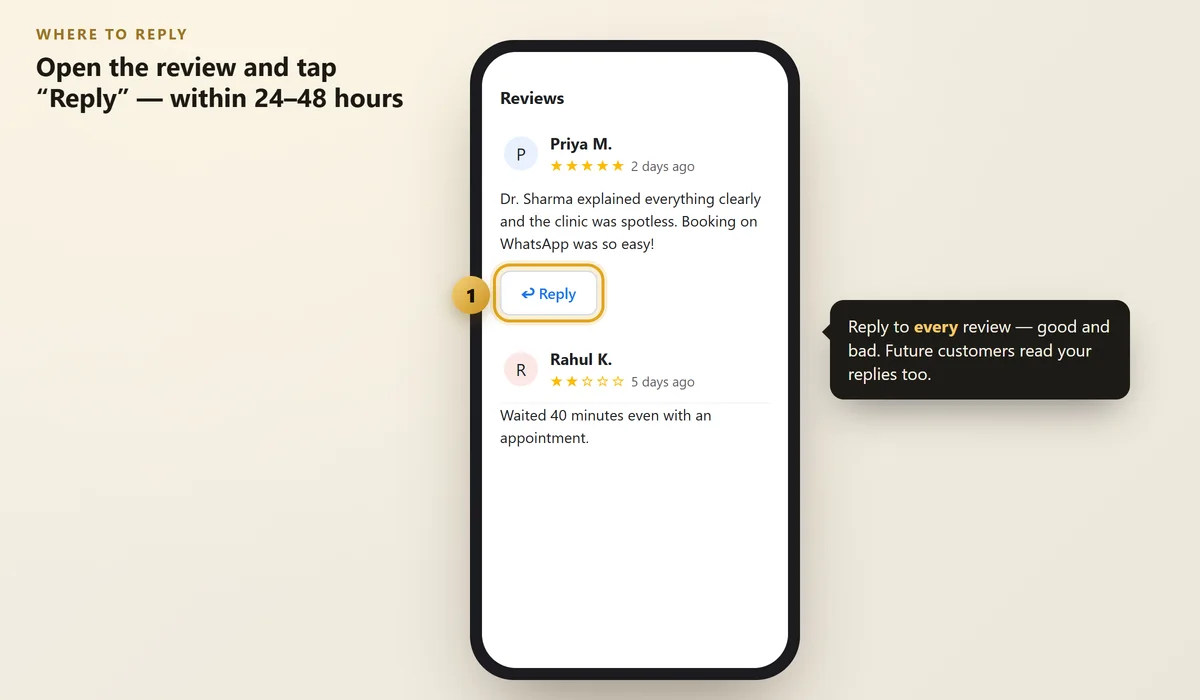
Click Reviews, then tap Reply under any review.
 Illustration
Try to reply within 24–48 hours. A quick reply to a complaint stops it from becoming a bigger problem.
Step #2: Reply to Positive Reviews (Keep It Personal)
A simple "Thanks!" is okay. But a personal reply is much better.
Use this 3-part formula:
- Thank them by name
- Mention something specific they said
- Invite them back
Step #3: Reply to Average (3-Star) Reviews
A 3-star review usually means: "Good, but something could be better."
Thank them, accept the feedback, and tell them what you'll improve.
Step #4: Reply to Negative Reviews (The 4-Step Formula)
This is where most owners make mistakes. They get angry, argue, or ignore it.
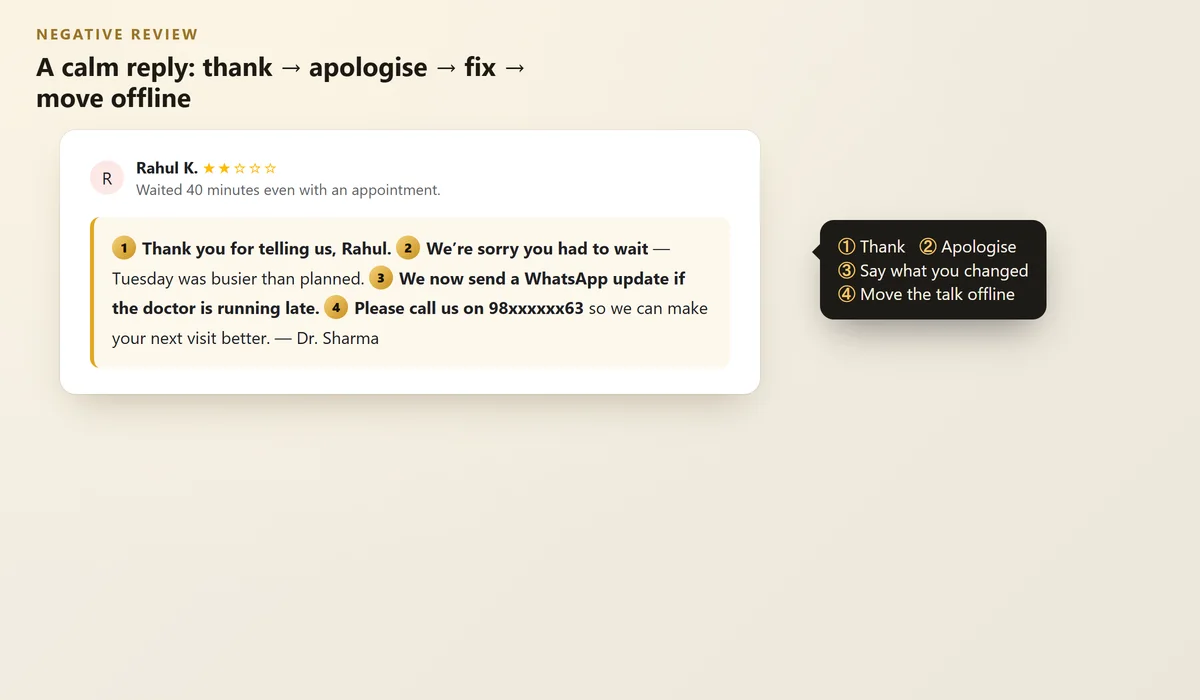
Instead, follow this simple formula:
- Thank them for the feedback
- Apologise for their experience (even if you think they're partly wrong)
- Explain what you changed or will change
- Move the conversation offline — give a phone or WhatsApp number
 Illustration
- Don't argue or blame the customer in public
- Don't share private details (like their treatment or bill)
- Don't offer money or discounts in exchange for changing a review
What About Fake or Abusive Reviews?
Sometimes you'll get a review from someone who never visited, or one with abusive language.
- Reply calmly once: "We can't find any record of your visit. Please contact us on [number] so we can understand what happened."
- Report the review to Google if it breaks their rules (spam, hate, fake, conflict of interest).
Google only removes reviews that break its policies — not reviews that are simply negative. That's why your calm reply matters so much.
Quick Reference Table
Review type | Goal of your reply | Length |
|---|---|---|
5 stars | Thank + make it personal | 1–2 lines |
3–4 stars | Thank + show you'll improve | 2–3 lines |
1–2 stars | Calm + fix + move offline | 3–4 lines |
Fake/abusive | One calm reply + report | 1–2 lines |
FAQs
Should I reply to every Google review?
Yes, ideally. Replying to both good and bad reviews shows that a real person cares. Even a short personal reply is better than silence.
Can I delete a bad Google review?
No, you can't delete reviews yourself. You can report a review if it breaks Google's policies (for example spam, fake or abusive content). Otherwise, reply politely and fix the problem.
Can I edit my reply later?
Yes. You can edit or delete your own reply at any time from your Business Profile.
Should I write replies in Hindi or English?
Reply in the language the customer used. If they wrote in Hindi or Hinglish, a reply in the same style feels more personal.
Is it okay to use the same reply for every review?
Avoid copying the exact same text. Use the templates as a starting point, but always add the customer's name and one specific detail.
Final Thoughts
Every review reply is a small advertisement for how you treat customers.
Reply quickly, stay calm, and keep it personal. Over time, your replies will win you customers you never even spoke to.
Need help managing your reviews?
We set up a simple review system for small businesses — more genuine reviews and timely replies.
Written by Nancy Dahiya
Nancy is the founder of Pehchaan Digital. She helps hospitals, coaching institutes, hotels and local businesses get found online — and writes these guides in plain language so owners can see what actually works.
Keep reading
All guides → Google & Local SEO
Google Business Profile Posts: 20 Post Ideas That Bring Customers
How to post on your Google profile, what makes a post work, and 20 ready ideas for clinics, coaching centres, cafés and shops.
 Google & Local SEO
Local Citations in India: Where to List Your Business (Free)
Why your name, address and phone must match everywhere — and the free directories every Indian small business should use.
 Google & Local SEO
Why Is My Business Not Showing on Google Maps? 12 Reasons (and Fixes)
Searched for your own business and it isn't there? Here are the most common reasons and exactly how to fix each one.