Google Business Profile Posts: 20 Post Ideas That Bring Customers
How to post on your Google profile, what makes a post work, and 20 ready ideas for clinics, coaching centres, cafés and shops.
 Nancy Dahiya6 min read
Most businesses set up their Google profile… and never touch it again.
That's a big missed chance.
Google lets you share free updates, offers and events right on your Business Profile — the same place customers see before they call you.
These are called posts. And in this guide, I'll show you how to create them, plus 20 ready ideas so you never run out of things to post.
What Are Google Business Profile Posts?
Posts are short updates (like mini social media posts) that appear on your Google Business Profile.
There are a few types:
- Updates — news, tips, photos, new services
- Offers — discounts with start and end dates
- Events — workshops, open days, festival specials
Google explains all post types in Create & manage posts on your Business Profile.
Why Bother Posting?
- Your profile looks active. Customers trust businesses that clearly still operate.
- You control the message. Promote what you want people to know right now.
- Buttons turn readers into enquiries. Each post can have a "Call", "Book" or "Learn more" button.
Step #1: Create Your First Post
- Search your business name on Google (while signed in) or open the Google Maps app
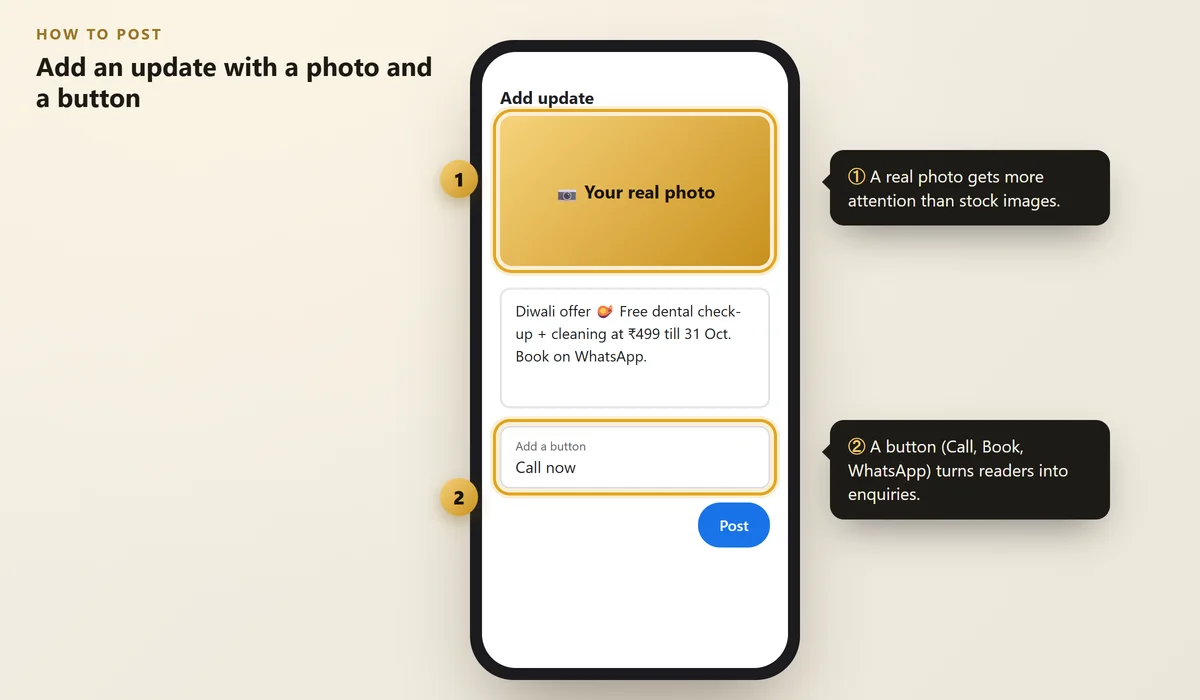
- Find your profile and tap Add update (or "Promote" → "Add update")
- Add a photo, write your text and add a button
- Tap Post
 Illustration
Use a real photo of your business — your team, your space, your work. Real photos feel more trustworthy than stock images.
Step #2: Write Posts That Get Action
Keep it simple. Every good post has three parts:
- A hook — the first line people read ("Diwali offer 🪔")
- The details — what, when, how much
- The action — "Book on WhatsApp", "Call now"
Make sure your posts follow Google's content policy — no misleading claims, no phone numbers in images, no offensive content.
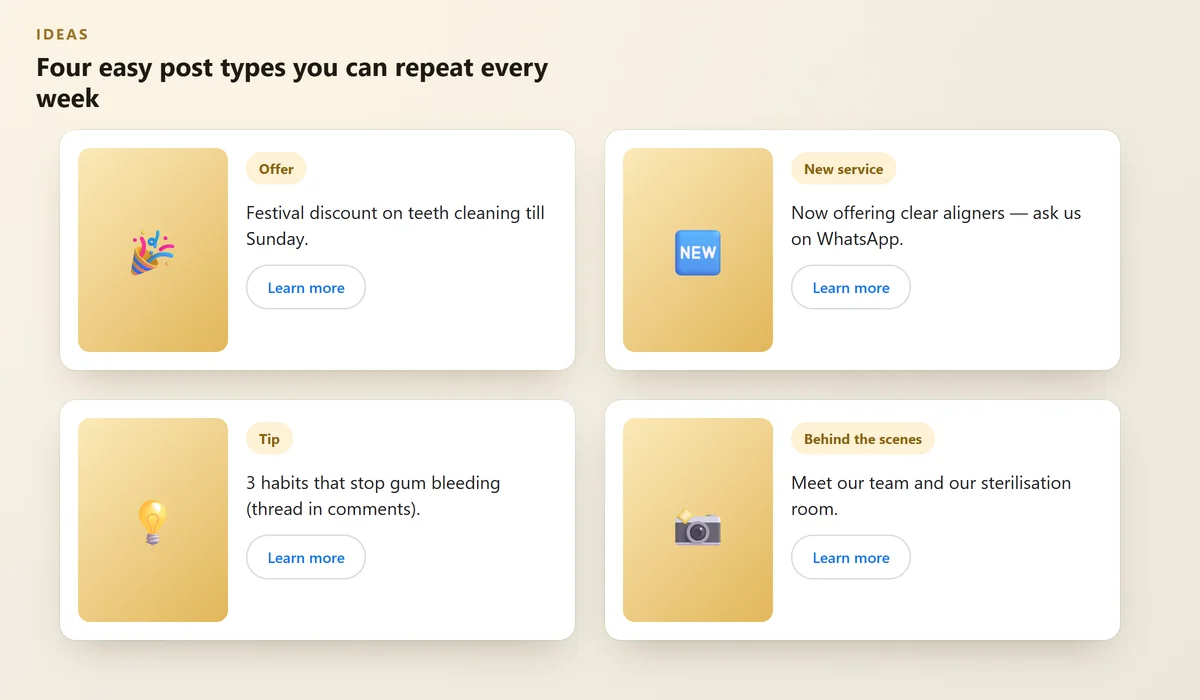
Step #3: Post Once a Week (Use These 4 Types)
You don't need to post every day. Once a week is enough for most small businesses.
Rotate these four types and you'll always have something to share:
 Illustration
20 Google Post Ideas (By Business Type)
Clinics & hospitals
- "Meet the doctor" — photo + qualifications
- A health tip for the season (dengue, monsoon, winter)
- New service or equipment
- Free check-up camp dates
Coaching institutes
- New batch starting date
- Results or toppers (with permission)
- A free demo class invite
- Exam tip of the week
Cafés, restaurants & hotels
- Dish of the week with a mouth-watering photo
- Festival menu or thali
- Live music or event night
- Room or seating photos after renovation
Salons & gyms
- Before & after (with permission)
- Wedding season packages
- New trainer or stylist introduction
- Quick tip video (hair care, workout)
Local shops
- New stock arrived
- Weekend sale
- "How to choose the right…" tip
- Thank-you post for a milestone (like 100 reviews)
Want more content ideas for social media too? Read How to Turn Instagram Followers Into Paying Customers.
Common Mistakes to Avoid
Mistake | Better approach |
|---|---|
Posting only once and stopping | Set a weekly reminder |
Text-only posts | Always add a real photo |
No button | Add Call, Book or Learn more |
Copy-pasting long Instagram captions | Keep it short and clear |
Old offers still showing | Use the Offer type with an end date |
FAQs
Are Google Business Profile posts free?
Yes. Creating posts on your Business Profile is free. They are different from Google Ads, which are paid.
How often should I post?
Once a week is a good, realistic goal for most small businesses. Consistency matters more than frequency.
Do posts help my ranking on Google Maps?
Posts mainly help customers who are already looking at your profile — they make it look active and give people a reason to call. Your category, reviews and complete details have a bigger effect on ranking.
Can I post the same thing on Instagram and Google?
Yes, but shorten it for Google and add a clear button. Don't include phone numbers inside the image.
Why was my post rejected?
Posts can be removed if they break Google's content policy — for example misleading offers, phone numbers in images, or unrelated content. Check the policy and post again.
Final Thoughts
Google posts are free advertising in the exact place customers are looking.
Pick one idea from the list, take a real photo, and post today. Then repeat every week.
Want a fully optimised Google profile?
We set up and manage Google Business Profiles — posts, photos, reviews and more.
Written by Nancy Dahiya
Nancy is the founder of Pehchaan Digital. She helps hospitals, coaching institutes, hotels and local businesses get found online — and writes these guides in plain language so owners can see what actually works.
Keep reading
All guides → Google & Local SEO
Local Citations in India: Where to List Your Business (Free)
Why your name, address and phone must match everywhere — and the free directories every Indian small business should use.
 Google & Local SEO
Why Is My Business Not Showing on Google Maps? 12 Reasons (and Fixes)
Searched for your own business and it isn't there? Here are the most common reasons and exactly how to fix each one.
 Google & Local SEO
How to Reply to Google Reviews (Templates for Good & Bad Reviews)
Copy-paste replies for 5-star, average and angry reviews — plus the 4-step formula that calms unhappy customers.